> Mass storage
Mass storage consists in storing large amounts of data on servers with large storage capacity and high transfer rates to the compute servers.
Mass storage is designed for data safety, but for not for high-availability or user-proof storage. The data is stored on servers where disks are organised in a way that allows to recover data in case of disk failure, but the servers themselves are not designed to be highly available. If a server fails, the data is not lost but it will be unavailable until the server is repaired. The servers also are not designed to be user-proof. When a file is deleted, it cannot be recovered. If you want to have a backup solution, you need to implement it yourself using the mass storage facilities. The CISM team can help you with that, but only upon request.
Mass storage is designed for regular-level data security but not for sensitive data. The servers are protected by a firewall and only accessible from within the university network, but they are not designed to be compliant with the requirements for storing sensitive data. Notably, they are shared servers and users have access to the same filesystem, so they can potentially access each other’s data if the access rights to the files are not properly configured. If you need to store sensitive data, you need to implement a solution (e.g., encryption) yourself using the mass storage facilities. The CISM team can help you with that, but only upon request.
Mass storage is designed for long-term storage, but not for archiving. Archiving consists in storing data that are not accessed for long periods of time. By contrast with mass storage high availability and high transfer rates are irrelevant; archiving is often done on low-consumption infrastructures with disks designed for stability when powered off. The mass storage infrastructure at CISM is not designed for archiving. Users can of course use the mass storage facilities for archiving, but the cost will correspond to mass storage and not to archiving.
List of servers
The following servers are currently available:
| Name | Netto capacity | File system | Note |
|---|---|---|---|
| storage09 | 260TB | ZFS | compressed - 2 SSD caches - 2 parity disks per 11 disks - 3 spare disks |
| storage10 | 270TB | ZFS | compressed - 2 SSD caches - 2 parity disks per 11 disks - 3 spare disks |
| storage11 | 410TB | ZFS | compressed - 2 SSD caches - 2 parity disks per 11 disks - 3 spare disks |
Access and file transfer
Access to the mass storage is done through SSH with the CISM
account at storage.cism.ucl.ac.be on port 22 from within the university
network. That server in a single point of access for all mass storage servers,
and it will automatically redirect you to the appropriate server depending on
your home directory.
Note that to have access to the mass storage, you need to have a home directory on the mass storage server. For that, you need to tick the “mass storage” box in the account management website and specify the person who will bear the costs as shown below.
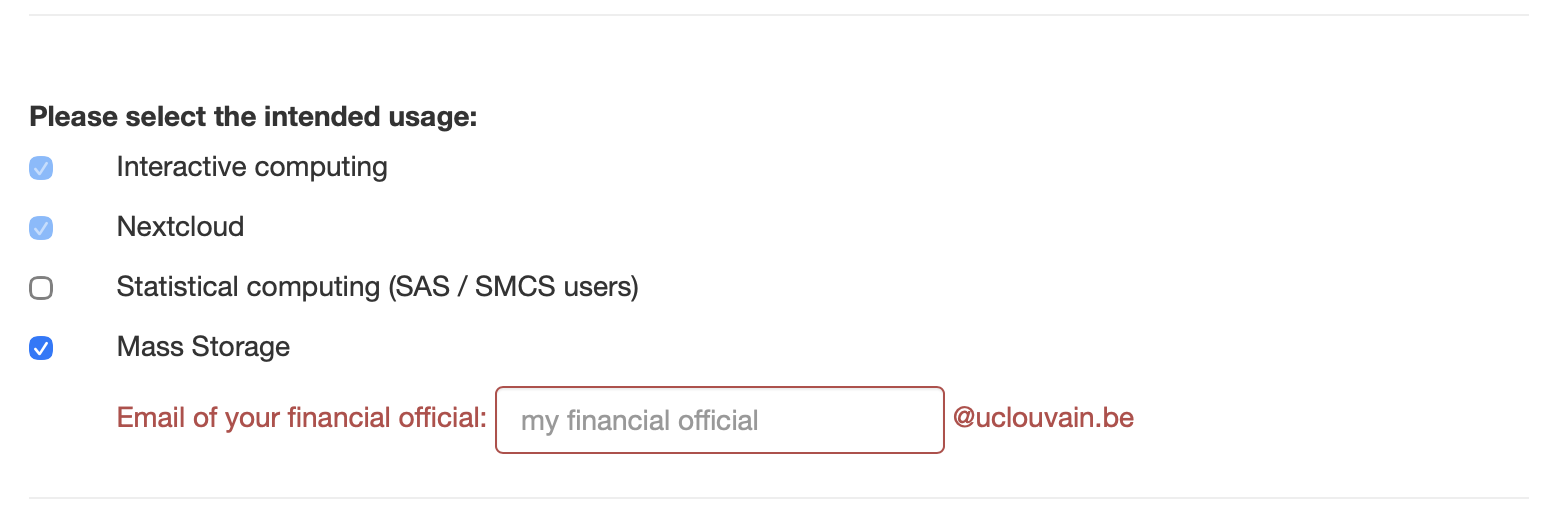
Please then send an email to the CISM team who will create the home directory on one of the mass storage servers depending on the expected volume and current allocations.
About the costs
Using the mass storage facilities comes at a cost. The cost per Gigabyte per year is determined each year by the Comité de Gestion. The cost structure is designed so as to amortize the cost of the hardware over its lifetime.
The total cost per year is computed as the average (integral) use of the storage space over the year. Alternatively, you can opt in for a package (‘forfait’), expressed in Terabytes. In the latter case, you will pay for the space corresponding to the package (‘forfait’) for the whole year. The price per Terabyte in the case you opt for the package (‘forfait’) is lower than in the other case.
The precise formula is given below:
with:
- \(APC\) : Annual Package Cost
- \(UC\) : Rate for proportional usage in €/TB/Year
- \(VP\) : Total Volume of the requested package
- \(VPM\) : Total Volume of the biggest package requested by a research group
For example, in 2020, the rate was computed using the following values:
UC = 50 €/TB/Year
VPM = 320 TB

example: APC = 39.94 € for a requested package of 1TB
The package (‘forfait’) is a concept that is related to how the storage is charged. If you buy a package (‘forfait’), then you have a fixed cost that does not depend on the actual storage used (provided you stay within the bounds of your package) by contrast to others you have a variable cost that depends on the storage used. Packages cost less per Gigabyte.
A quota is a technical concept that is related to a particular server. Servers indeed have a fixed capacity which is shared among users. Each user group (in the Unix sense or in the Research group sense, it depends on the server) has a fixed quota that the group cannot exceed.
A group with large needs will probably have several quotas on several servers ; the sum of which should correspond to their package size (‘forfait’).